반응형
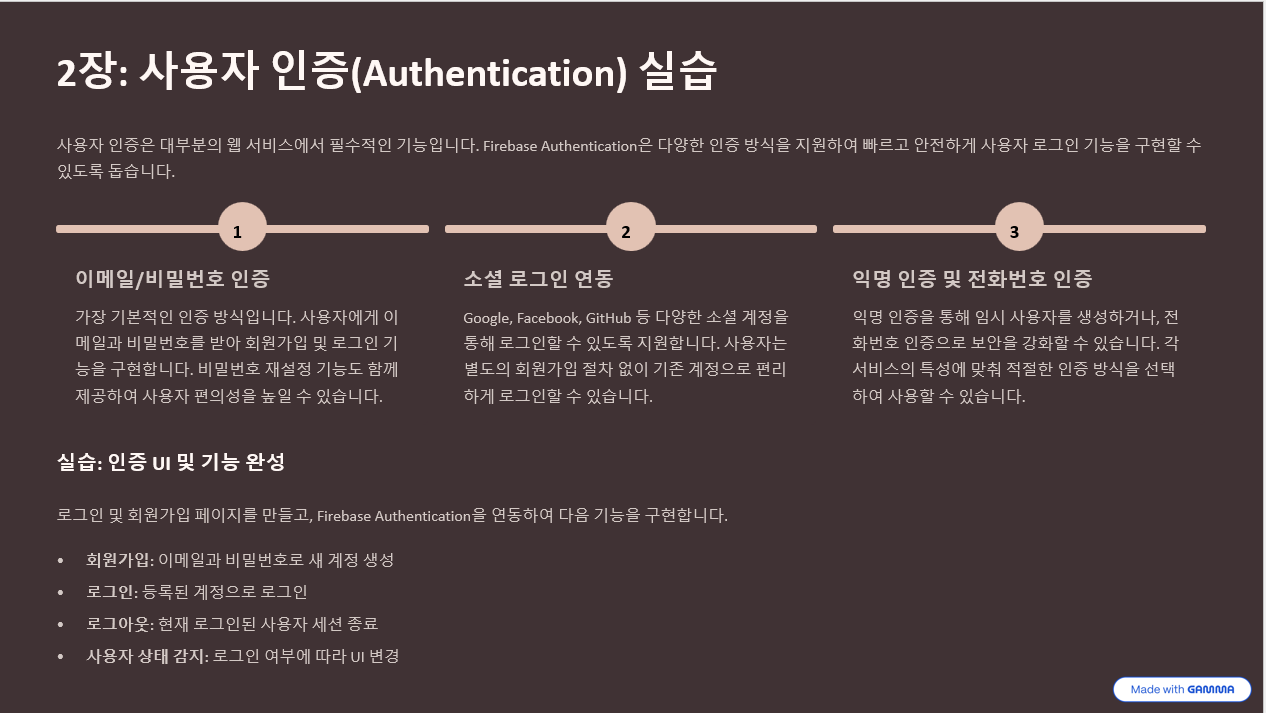
🏰 우리 웹사이트를 특별한 성으로 만들기
우리가 만들 웹사이트를 마법의 성이라고 생각해보세요! 이 성에는:
- 🚪 입구 (로그인)
- 📝 회원가입 데스크
- 🏃♂️ 출구 (로그아웃)
- 👮♂️ 경비원 (상태 감지)
이 모든 걸 Firebase가 도와줄 거예요!
🎯 먼저 Firebase 콘솔에서 인증 설정하기
1단계: Firebase 콘솔 접속
- Firebase 콘솔에 들어가세요
- 여러분의 프로젝트를 클릭하세요
2단계: Authentication 활성화
- 왼쪽 메뉴에서 "Authentication" 클릭
- "시작하기" 버튼 클릭
- "Sign-in method" 탭 클릭
- "이메일/비밀번호" 를 클릭하고 "사용 설정" 체크
- "저장" 버튼 클릭
이제 우리 성에 마법의 문이 설치되었어요! ✨
🏗️ 완전한 인증 시스템 만들기
Firebase 사용자 인증 시스템
대화형 아티팩트
🎯 코드 설명 - 각 기능별로 쉽게 이해하기
📝 회원가입 (signupUser 함수)
javascript
function signupUser() {
    // 1️⃣ 사용자가 입력한 정보 가져오기
    const email = document.getElementById('signupEmail').value;
    const password = document.getElementById('signupPassword').value;

    // 2️⃣ Firebase에게 "새 마법사 만들어줘!" 요청
    auth.createUserWithEmailAndPassword(email, password)
        .then(() => {
            // 3️⃣ 성공하면 축하 메시지!
            console.log("🎉 새 마법사 탄생!");
        })
        .catch((error) => {
            // 4️⃣ 실패하면 친절하게 알려주기
            console.log("😢 마법사 되기 실패:", error);
        });
}
🚪 로그인 (loginUser 함수)
javascript
function loginUser() {
    // 1️⃣ 이메일과 비밀번호 받기
    const email = document.getElementById('loginEmail').value;
    const password = document.getElementById('loginPassword').value;

    // 2️⃣ Firebase에게 "이 사람 맞나?" 확인 요청
    auth.signInWithEmailAndPassword(email, password)
        .then(() => {
            // 3️⃣ 맞다면 성 안으로 들어가기!
            console.log("🎉 성 입장 성공!");
        });
}🏃♂️ 로그아웃 (logoutUser 함수)
javascript
function logoutUser() {
    // Firebase에게 "나 이제 나갈래!" 알리기
    auth.signOut()
        .then(() => {
            console.log("👋 안전하게 성을 나왔어요!");
        });
}👮♂️ 상태 감지 (onAuthStateChanged)
가장 마법 같은 기능이에요! Firebase가 자동으로 경비원 역할을 해줘요:
javascript
auth.onAuthStateChanged((user) => {
    if (user) {
        // 로그인된 마법사다!
        console.log("✅ 등록된 마법사 확인!");
        showUserScreen(user); // 특별한 화면 보여주기
    } else {
        // 그냥 손님이다
        console.log("❌ 손님입니다");
        showAuthScreen(); // 로그인 화면 보여주기
    }
});
🎮 실제로 해보기!
1단계: 설정 넣기
위 코드에서 이 부분을 여러분의 실제 Firebase 설정으로 바꿔주세요:
javascript
const firebaseConfig = {
    apiKey: "your-api-key-here",  // 여기에 실제 API 키
    authDomain: "your-project.firebaseapp.com",  // 실제 도메인
    projectId: "your-project-id",  // 실제 프로젝트 ID
    // ... 나머지도 실제 값으로
};
2단계: 테스트해보기
- 파일을 브라우저에서 열기
- F12 눌러서 콘솔 열기
- 회원가입 해보기 (test@example.com / 123456)
- 로그아웃 하기
- 다시 로그인하기
3단계: 마법 관찰하기
콘솔에서 이런 메시지들을 볼 수 있어요:
🎉 Firebase 마법이 시작되었어요!
📝 새로운 마법사 등록 시작: test@example.com
👮♂️ 경비원이 신원을 확인했어요: [User Object]
✅ 확인됨: 등록된 마법사입니다!
🏠 사용자 화면을 표시합니다🎯 각 기능이 어떻게 작동하는지
🔄 상태 감지의 마법
Firebase는 24시간 경비원처럼 항상 지켜보고 있어요:
- 사용자가 로그인하면 → 즉시 알려줌 ✅
- 사용자가 로그아웃하면 → 즉시 알려줌 ❌
- 페이지를 새로고침해도 → 로그인 상태 유지! 🔄
🎨 UI 변경의 마법
javascript
if (user) {
    // 로그인했을 때
    document.getElementById('authScreen').classList.add('hidden');     // 로그인 화면 숨기기
    document.getElementById('userScreen').classList.remove('hidden');  // 사용자 화면 보여주기
} else {
    // 로그아웃했을 때
    document.getElementById('authScreen').classList.remove('hidden');  // 로그인 화면 보여주기
    document.getElementById('userScreen').classList.add('hidden');     // 사용자 화면 숨기기
}
🚨 문제 해결 가이드
😢 "등록되지 않은 마법사" 에러
→ Firebase 콘솔에서 Authentication이 활성화되었는지 확인!
😅 "비밀 주문이 틀렸어요" 에러
→ 비밀번호를 정확히 입력했는지 확인!
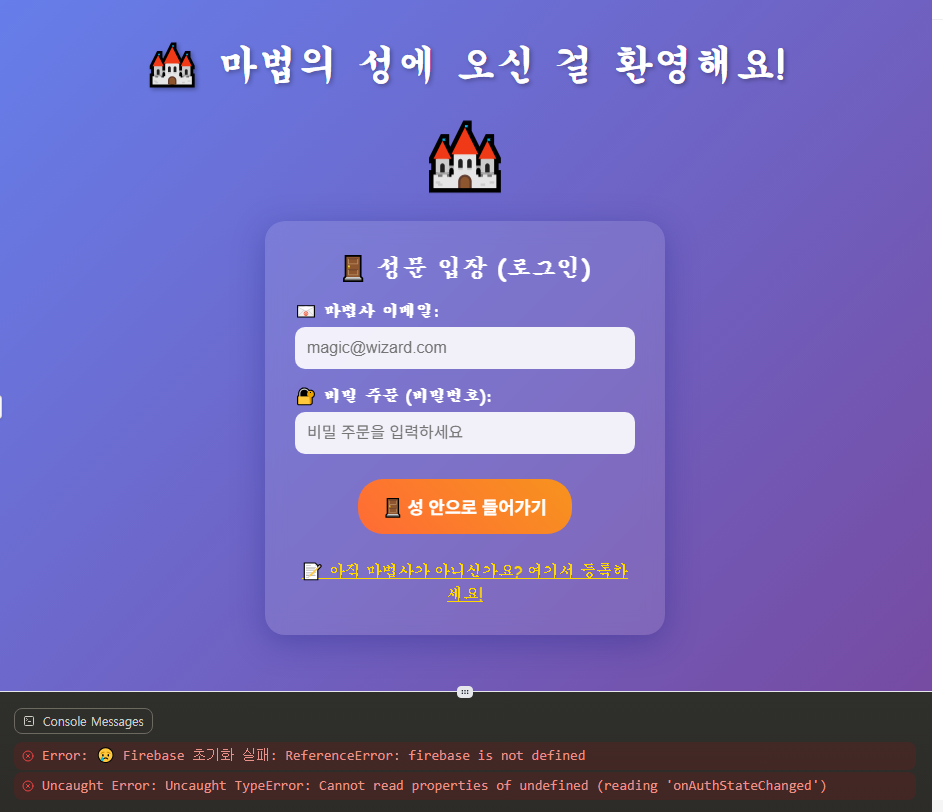
🔧 아무것도 작동 안 함
→ F12 → Console에서 빨간 에러 메시지 확인!
🎉 축하해요!
이제 여러분은:
- ✅ 회원가입 시스템을 만들 수 있어요
- ✅ 로그인/로그아웃 기능을 구현할 수 있어요
- ✅ 사용자 상태에 따라 화면을 바꿀 수 있어요
- ✅ 실시간으로 인증 상태를 감지할 수 있어요
여러분은 이제 진짜 웹 개발 마법사가 되었어요! 🧙♂️✨
전체 소스코드
<!DOCTYPE html>
<html lang="ko">
<head>
<meta charset="UTF-8">
<meta name="viewport" content="width=device-width, initial-scale=1.0">
<title>🏰 마법의 성 - Firebase 인증</title>
<style>
* {
margin: 0;
padding: 0;
box-sizing: border-box;
}
body {
font-family: 'Comic Sans MS', cursive;
background: linear-gradient(135deg, #667eea 0%, #764ba2 100%);
color: white;
min-height: 100vh;
padding: 20px;
}
.container {
max-width: 800px;
margin: 0 auto;
text-align: center;
}
h1 {
font-size: 2.5em;
margin: 20px 0;
text-shadow: 2px 2px 4px rgba(0,0,0,0.3);
}
.castle {
font-size: 4em;
margin: 20px;
animation: bounce 3s ease-in-out infinite;
}
@keyframes bounce {
0%, 100% { transform: translateY(0px); }
50% { transform: translateY(-20px); }
}
.auth-container {
background: rgba(255, 255, 255, 0.1);
backdrop-filter: blur(10px);
border-radius: 20px;
padding: 30px;
margin: 20px auto;
max-width: 400px;
box-shadow: 0 8px 32px 0 rgba(31, 38, 135, 0.37);
}
.form-group {
margin: 15px 0;
text-align: left;
}
label {
display: block;
margin-bottom: 5px;
font-weight: bold;
}
input {
width: 100%;
padding: 12px;
border: none;
border-radius: 10px;
font-size: 1em;
background: rgba(255, 255, 255, 0.9);
color: #333;
}
input:focus {
outline: none;
box-shadow: 0 0 10px rgba(255, 255, 255, 0.5);
transform: scale(1.02);
}
button {
background: linear-gradient(45deg, #ff6b35, #f7931e);
color: white;
border: none;
padding: 15px 25px;
border-radius: 25px;
font-size: 1.1em;
cursor: pointer;
margin: 10px 5px;
transition: all 0.3s ease;
font-weight: bold;
}
button:hover {
transform: translateY(-2px);
box-shadow: 0 5px 15px rgba(0,0,0,0.2);
}
button:active {
transform: translateY(0);
}
.btn-logout {
background: linear-gradient(45deg, #e74c3c, #c0392b);
}
.user-info {
background: rgba(76, 175, 80, 0.2);
border: 2px solid rgba(76, 175, 80, 0.5);
border-radius: 15px;
padding: 20px;
margin: 20px 0;
}
.status-message {
padding: 15px;
border-radius: 10px;
margin: 15px 0;
font-weight: bold;
}
.success {
background: rgba(76, 175, 80, 0.3);
border: 1px solid #4CAF50;
}
.error {
background: rgba(244, 67, 54, 0.3);
border: 1px solid #f44336;
}
.info {
background: rgba(33, 150, 243, 0.3);
border: 1px solid #2196F3;
}
.hidden {
display: none;
}
.toggle-link {
color: #ffd700;
cursor: pointer;
text-decoration: underline;
margin-top: 15px;
display: block;
}
.toggle-link:hover {
color: #ffed4a;
}
.welcome-screen {
background: rgba(76, 175, 80, 0.1);
border-radius: 20px;
padding: 40px;
margin: 20px 0;
}
.user-avatar {
font-size: 3em;
margin: 20px 0;
}
</style>
</head>
<body>
<div class="container">
<h1>🏰 마법의 성에 오신 걸 환영해요!</h1>
<div class="castle">🏰</div>
<!-- 상태 메시지 표시 영역 -->
<div id="statusMessage"></div>
<!-- 로그인하지 않은 사용자용 화면 -->
<div id="authScreen">
<div class="auth-container">
<!-- 로그인 폼 -->
<div id="loginForm">
<h2>🚪 성문 입장 (로그인)</h2>
<div class="form-group">
<label>📧 마법사 이메일:</label>
<input type="email" id="loginEmail" placeholder="magic@wizard.com">
</div>
<div class="form-group">
<label>🔐 비밀 주문 (비밀번호):</label>
<input type="password" id="loginPassword" placeholder="비밀 주문을 입력하세요">
</div>
<button onclick="loginUser()">🚪 성 안으로 들어가기</button>
<div class="toggle-link" onclick="showSignupForm()">
📝 아직 마법사가 아니신가요? 여기서 등록하세요!
</div>
</div>
<!-- 회원가입 폼 -->
<div id="signupForm" class="hidden">
<h2>📝 마법사 등록 (회원가입)</h2>
<div class="form-group">
<label>📧 마법사 이메일:</label>
<input type="email" id="signupEmail" placeholder="magic@wizard.com">
</div>
<div class="form-group">
<label>🔐 비밀 주문 만들기:</label>
<input type="password" id="signupPassword" placeholder="강력한 비밀 주문을 만드세요">
</div>
<div class="form-group">
<label>🔐 비밀 주문 확인:</label>
<input type="password" id="confirmPassword" placeholder="비밀 주문을 다시 입력하세요">
</div>
<button onclick="signupUser()">📝 마법사로 등록하기</button>
<div class="toggle-link" onclick="showLoginForm()">
🚪 이미 마법사이신가요? 여기서 입장하세요!
</div>
</div>
</div>
</div>
<!-- 로그인한 사용자용 화면 -->
<div id="userScreen" class="hidden">
<div class="welcome-screen">
<div class="user-avatar">🧙♂️</div>
<h2>🎉 환영합니다, 위대한 마법사님!</h2>
<div class="user-info" id="userInfo">
<!-- 사용자 정보가 여기에 표시됩니다 -->
</div>
<button class="btn-logout" onclick="logoutUser()">🏃♂️ 성에서 나가기 (로그아웃)</button>
<button onclick="testAuthState()">🧪 마법 상태 확인</button>
</div>
</div>
</div>
<!-- Firebase SDK -->
<script src="https://www.gstatic.com/firebasejs/10.7.1/firebase-app.js"></script>
<script src="https://www.gstatic.com/firebasejs/10.7.1/firebase-auth.js"></script>
<script>
// 🔑 Firebase 설정 (여기에 여러분의 실제 설정을 넣어주세요!)
const firebaseConfig = {
apiKey: "your-api-key-here",
authDomain: "your-project.firebaseapp.com",
projectId: "your-project-id",
storageBucket: "your-project.appspot.com",
messagingSenderId: "123456789",
appId: "your-app-id-here"
};
// 🚀 Firebase 초기화
let app;
let auth;
try {
app = firebase.initializeApp(firebaseConfig);
auth = firebase.auth();
console.log("🎉 Firebase 마법이 시작되었어요!");
showStatus("🎉 마법의 성이 준비되었어요!", "success");
} catch (error) {
console.error("😢 Firebase 초기화 실패:", error);
showStatus("😢 마법의 성 준비 중 오류가 발생했어요. 설정을 확인해주세요!", "error");
}
// 📝 회원가입 함수
function signupUser() {
const email = document.getElementById('signupEmail').value;
const password = document.getElementById('signupPassword').value;
const confirmPassword = document.getElementById('confirmPassword').value;
// 입력값 검사
if (!email || !password) {
showStatus("😅 이메일과 비밀번호를 모두 입력해주세요!", "error");
return;
}
if (password !== confirmPassword) {
showStatus("😅 비밀번호가 일치하지 않아요!", "error");
return;
}
if (password.length < 6) {
showStatus("😅 비밀번호는 6글자 이상이어야 해요!", "error");
return;
}
console.log("📝 새로운 마법사 등록 시작:", email);
showStatus("✨ 마법사 등록 중...", "info");
// Firebase로 회원가입
auth.createUserWithEmailAndPassword(email, password)
.then((userCredential) => {
const user = userCredential.user;
console.log("🎉 마법사 등록 성공!", user);
showStatus("🎉 축하해요! 새로운 마법사가 되었어요!", "success");
clearInputs();
})
.catch((error) => {
console.error("😢 등록 실패:", error);
let message = "😢 마법사 등록에 실패했어요.";
// 에러 종류별 친근한 메시지
if (error.code === 'auth/email-already-in-use') {
message = "😅 이미 등록된 이메일이에요! 로그인을 시도해보세요.";
} else if (error.code === 'auth/invalid-email') {
message = "😅 올바른 이메일 형식을 입력해주세요.";
} else if (error.code === 'auth/weak-password') {
message = "😅 더 강한 비밀번호를 만들어주세요!";
}
showStatus(message, "error");
});
}
// 🚪 로그인 함수
function loginUser() {
const email = document.getElementById('loginEmail').value;
const password = document.getElementById('loginPassword').value;
if (!email || !password) {
showStatus("😅 이메일과 비밀번호를 모두 입력해주세요!", "error");
return;
}
console.log("🚪 마법사 입장 시도:", email);
showStatus("🔍 마법사 신원 확인 중...", "info");
// Firebase로 로그인
auth.signInWithEmailAndPassword(email, password)
.then((userCredential) => {
const user = userCredential.user;
console.log("🎉 입장 성공!", user);
showStatus("🎉 환영합니다! 성 안으로 들어오세요!", "success");
clearInputs();
})
.catch((error) => {
console.error("😢 로그인 실패:", error);
let message = "😢 성 입장에 실패했어요.";
// 에러 종류별 친근한 메시지
if (error.code === 'auth/user-not-found') {
message = "😅 등록되지 않은 마법사예요. 먼저 회원가입을 해주세요!";
} else if (error.code === 'auth/wrong-password') {
message = "😅 비밀 주문이 틀렸어요! 다시 시도해보세요.";
} else if (error.code === 'auth/invalid-email') {
message = "😅 올바른 이메일 형식을 입력해주세요.";
}
showStatus(message, "error");
});
}
// 🏃♂️ 로그아웃 함수
function logoutUser() {
console.log("🏃♂️ 마법사가 성에서 나갑니다...");
showStatus("👋 안전하게 성에서 나가는 중...", "info");
auth.signOut()
.then(() => {
console.log("✅ 로그아웃 성공!");
showStatus("👋 안전하게 성을 나왔어요! 또 놀러오세요!", "success");
})
.catch((error) => {
console.error("😢 로그아웃 오류:", error);
showStatus("😅 성에서 나가는 중 문제가 생겼어요.", "error");
});
}
// 👮♂️ 사용자 상태 감지 (Firebase의 마법!)
auth.onAuthStateChanged((user) => {
console.log("👮♂️ 경비원이 신원을 확인했어요:", user);
if (user) {
// 로그인된 상태
console.log("✅ 확인됨: 등록된 마법사입니다!");
showUserScreen(user);
} else {
// 로그인되지 않은 상태
console.log("❌ 미확인: 손님입니다.");
showAuthScreen();
}
});
// 🖥️ 로그인 화면 보여주기
function showAuthScreen() {
document.getElementById('authScreen').classList.remove('hidden');
document.getElementById('userScreen').classList.add('hidden');
console.log("🖥️ 로그인 화면을 표시합니다");
}
// 🏠 사용자 화면 보여주기
function showUserScreen(user) {
document.getElementById('authScreen').classList.add('hidden');
document.getElementById('userScreen').classList.remove('hidden');
// 사용자 정보 표시
document.getElementById('userInfo').innerHTML = `
<h3>🧙♂️ 마법사 정보</h3>
<p><strong>📧 마법사 이메일:</strong> ${user.email}</p>
<p><strong>🆔 마법사 ID:</strong> ${user.uid}</p>
<p><strong>📅 등록 날짜:</strong> ${user.metadata.creationTime}</p>
<p><strong>🔄 마지막 로그인:</strong> ${user.metadata.lastSignInTime}</p>
<p><strong>✅ 이메일 인증:</strong> ${user.emailVerified ? '완료' : '미완료'}</p>
`;
console.log("🏠 사용자 화면을 표시합니다");
}
// 📝 폼 전환 함수들
function showSignupForm() {
document.getElementById('loginForm').classList.add('hidden');
document.getElementById('signupForm').classList.remove('hidden');
clearInputs();
}
function showLoginForm() {
document.getElementById('signupForm').classList.add('hidden');
document.getElementById('loginForm').classList.remove('hidden');
clearInputs();
}
// 🧹 입력 필드 정리 함수
function clearInputs() {
const inputs = document.querySelectorAll('input');
inputs.forEach(input => input.value = '');
}
// 📢 상태 메시지 표시 함수
function showStatus(message, type) {
const statusDiv = document.getElementById('statusMessage');
statusDiv.innerHTML = `<div class="status-message ${type}">${message}</div>`;
// 3초 후 메시지 자동 삭제
setTimeout(() => {
statusDiv.innerHTML = '';
}, 3000);
}
// 🧪 인증 상태 테스트 함수
function testAuthState() {
const user = auth.currentUser;
if (user) {
console.log("🧪 현재 마법사 상태:");
console.log(" 📧 이메일:", user.email);
console.log(" 🆔 ID:", user.uid);
console.log(" ✅ 로그인 상태: 활성");
showStatus("🧪 마법 상태: 활성화! 모든 마법을 사용할 수 있어요!", "success");
} else {
console.log("🧪 현재 상태: 손님 (로그인 필요)");
showStatus("🧪 마법 상태: 비활성화. 마법을 사용하려면 로그인하세요!", "info");
}
}
// 🎮 페이지 로드 시 초기화
window.onload = function() {
console.log("🎮 마법의 성이 열렸어요!");
console.log("👀 사용법:");
console.log(" 1️⃣ F12를 눌러 콘솔을 열어보세요");
console.log(" 2️⃣ 회원가입 또는 로그인을 해보세요");
console.log(" 3️⃣ 상태 변화를 관찰해보세요");
showStatus("🏰 마법의 성에 오신 걸 환영해요! 마법사가 되어보세요!", "info");
};
</script>
</body>
</html>
미리 보기
반응형
'데이터베이스' 카테고리의 다른 글
| [Firebase] 5장 실시간 채팅 기능 구현 (1) | 2025.08.23 |
|---|---|
| [Firebase] 4장 FirebaseStorage를 활용한 파일 업로드 실습 (3) | 2025.08.23 |
| [Firebase] 3장 Cloud firestore 데이터베이스 실습 (1) | 2025.08.23 |
| [Firebase] 1장: Firebase 소개 및 개발 환경 설정 (0) | 2025.08.23 |